Master Data: Kostenträger
Informationen zum Artikel

Autor: Dmitry Dugarev
Under Kostenträger (cost bearer), you define who receives the invoice, where it goes, how it's calculated, and how it looks.
Understanding the Connections
The Kostenträger is the hub between the job and the finished invoice. Almost everything that makes up an invoice depends on it.


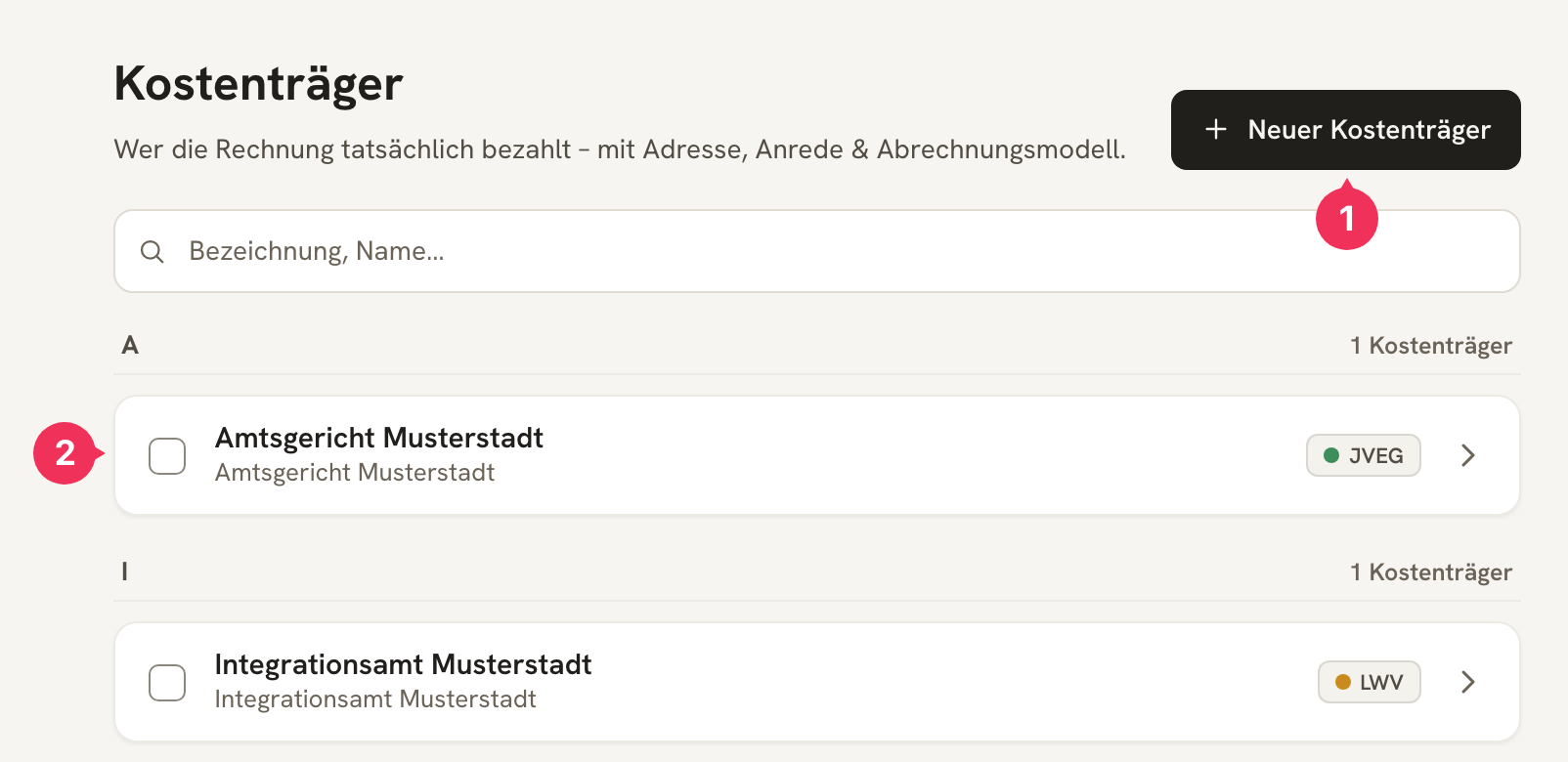
- Neuer Kostenträger creates a new entry.
- Clicking a row opens it for editing.
The Fields in Detail
The form is divided into three sections.
Stammdaten
These are the basic details (Stammdaten) that determine what appears in the invoice's address field.
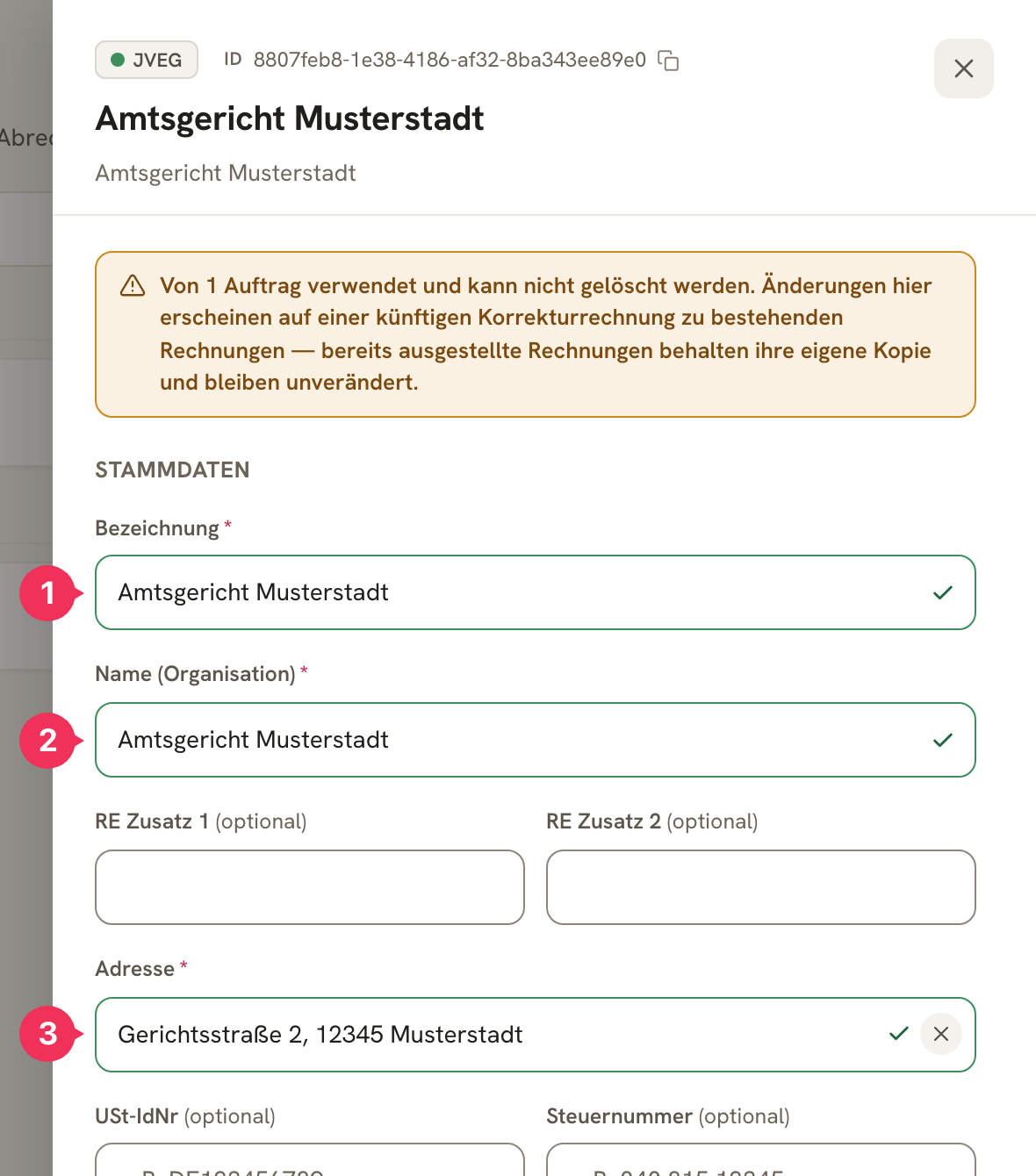
| Feld | Erklärung |
|---|---|
| 1 Bezeichnung | The internal short name. It appears in selection lists and is the name you can write in your calendar. Short and unambiguous, e.g. LWV (Kassel). It does not appear on the invoice. |
| 2 Name (Organisation) | The official name that appears on the invoice, e.g. Landeswohlfahrtsverband Hessen. |
| RE Zusatz 1 / 2 | Optional extra lines above the address – department, unit, P.O. box. |
| 3 Adresse | The complete postal address. |
| USt-IdNr. / Steuernummer | Optional. Needed if the Kostenträger expects it on the invoice. |
Kontakt
| Feld | Erklärung |
|---|---|
| Ansprechpartner | Optional. The person the invoice is addressed to. |
| Anrede | The salutation line, available as a placeholder in the Rechnungsvorlage (invoice template), e.g. Sehr geehrte Frau Müller,. |
| The address invoices and Mahnungen (reminders) are sent to. | |
| CC-Mail | Optional. An address to CC. |
Abrechnung
In this Abrechnung (billing) section, you link the Kostenträger to the rules and texts from the other areas.
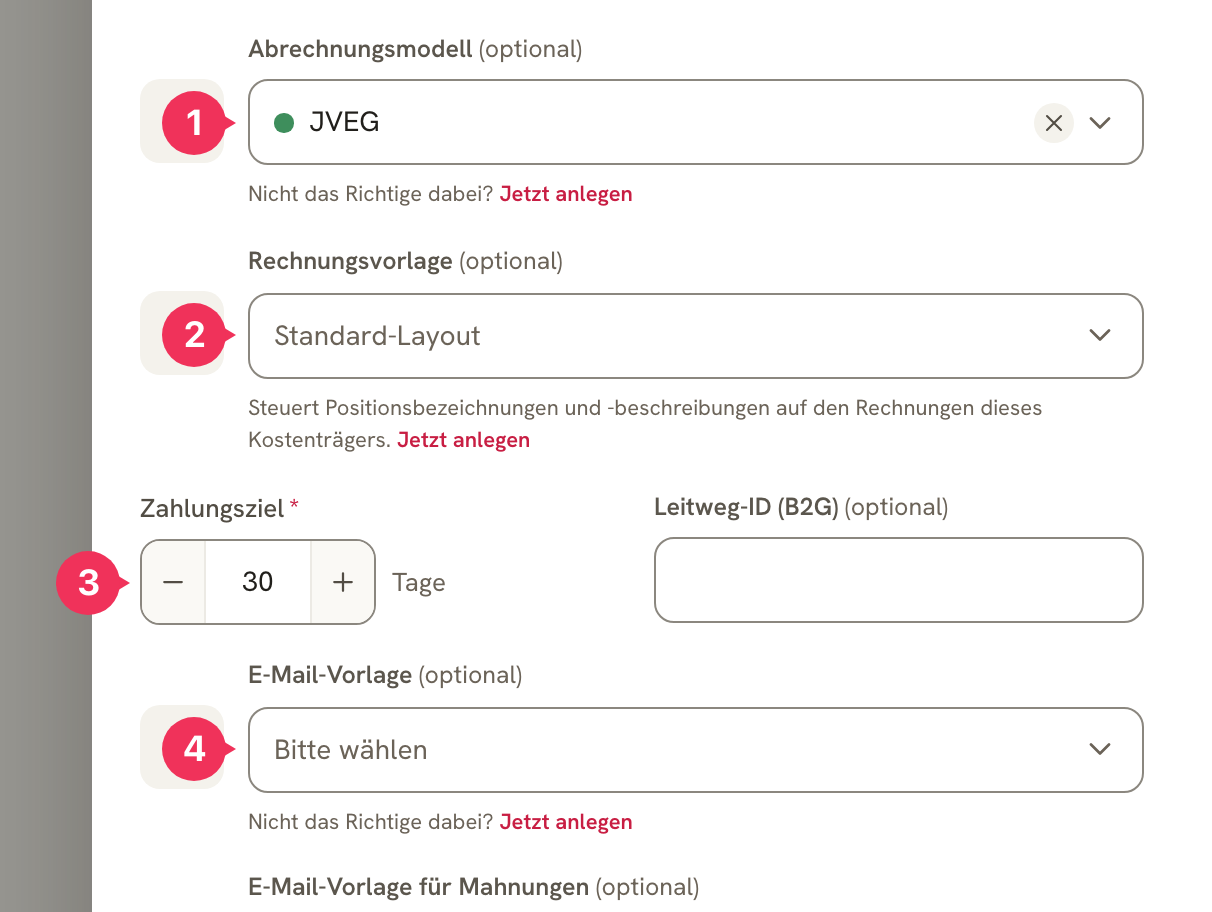
| Feld | Erklärung |
|---|---|
| 1 Abrechnungsmodell | The pricing model from Abrechnungsmodelle (billing models). It determines the hourly rate, travel costs, and cancellation rules. |
| 2 Rechnungsvorlage | Controls the line-item names, descriptions, and note texts on this Kostenträger's invoices. If none is selected, the standard layout applies. |
| 3 Zahlungsziel | Days until the invoice is due. If no value is set here, the standard Zahlungsziel (payment term) from Settings applies. |
| Leitweg-ID (B2G) | Only for invoices to public-sector contracting authorities that require a Leitweg-ID. It's included in the E-Rechnung. |
| 4 E-Mail-Vorlage | Subject and body of the outgoing email (see E-Mail Vorlagen). |
| E-Mail-Vorlage für Mahnungen | Optionally, a separate template for payment reminders. If none is selected, the regular E-Mail-Vorlage is used. |
Automatisierung
Two switches in this Automatisierung (automation) section decide how much DolmiDesk™ handles on its own for this Kostenträger.
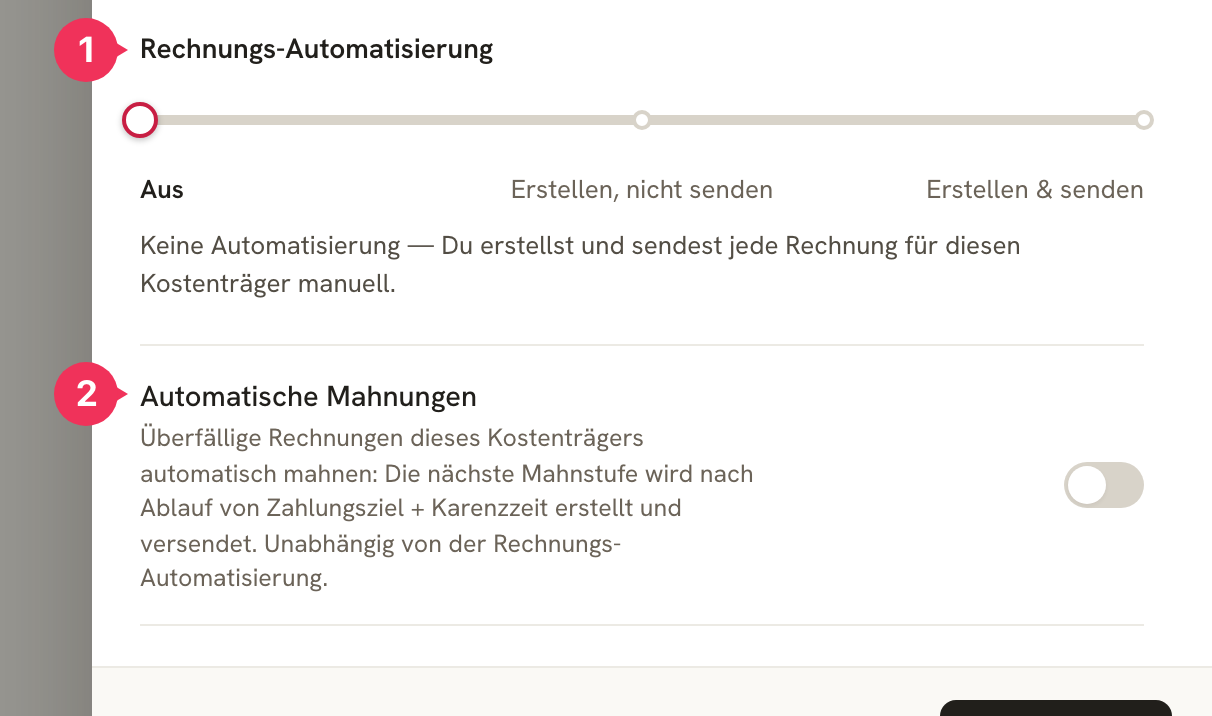
1 Rechnungs-Automatisierung (invoice automation) – three stages:
| Stufe | Wirkung |
|---|---|
| Aus | Nothing happens automatically. You create and send every invoice yourself. |
| Erstellen, nicht senden | As soon as a job imported from the calendar is fully documented, the invoice is created automatically – but it's held for review. |
| Erstellen & senden | The invoice is created automatically and sent by email. Requires a stored email address. |
2 Automatische Mahnungen (automatic reminders) – overdue invoices from this Kostenträger are dunned automatically: the next Mahnstufe (reminder stage) is generated once Zahlungsziel + Karenzzeit (grace period) have elapsed, and goes out right away. This runs independently of the Rechnungs-Automatisierung.
Guide: Creating a New Kostenträger
Let's say a new payer comes on board: “Muster-Krankenkasse”.
Enter the Stammdaten
Click Neuer Kostenträger and fill in the required fields:
| Bezeichnung | Name (Organisation) | Adresse |
|---|---|---|
| MK | Muster-Krankenkasse | Kassenweg 5, 12345 Musterstadt |
Add the Kontakt
| Anrede | CC-Mail | |
|---|---|---|
| Sehr geehrte Damen und Herren, | rechnung@musterkasse.beispiel.de |
Link the Abrechnung
Choose the appropriate Abrechnungsmodell and templates. For a health insurance fund, for example:
| Abrechnungsmodell | Rechnungsvorlage | Zahlungsziel | E-Mail-Vorlage |
|---|---|---|---|
| JVEG | Krankenkasse | 30 Tage | Standard |
Decide on the Automatisierung
For a Kostenträger you know well and that always bills the same way, Erstellen, nicht senden is worth it – the invoice is ready by the time you review it. For anything new, leave the automation set to Aus for now.
Save
Done. From now on, you can assign this Kostenträger to a client as their default, select it directly on a job, or name it in the calendar entry with Kostenträger: MK.
Editing and Deleting
Master data changes over time – addresses change, caseworkers move on. Two rules make sure that doesn't throw your bookkeeping into disarray:
- A Kostenträger already linked to a job cannot be deleted. But you can edit it at any time.
- Invoices already issued keep their own copy of the data. So a new address doesn't retroactively appear on old invoices – it applies to everything created afterward (and to any later correction invoice).
About the author