Calculation Models: The Rate Logic
Informationen zum Artikel

Autor: Dmitry Dugarev
For DolmiDesk™ to automatically calculate the correct prices, the "rules of the game" need to be stored. Since interpreter fees rarely consist of a single rate – JVEG, travel-time flat fees, mileage allowance, no-show tiers – an Abrechnungsmodell (calculation model) bundles everything that determines the price of an assignment.
You'll find them in the navigation under Abrechnungsmodelle.
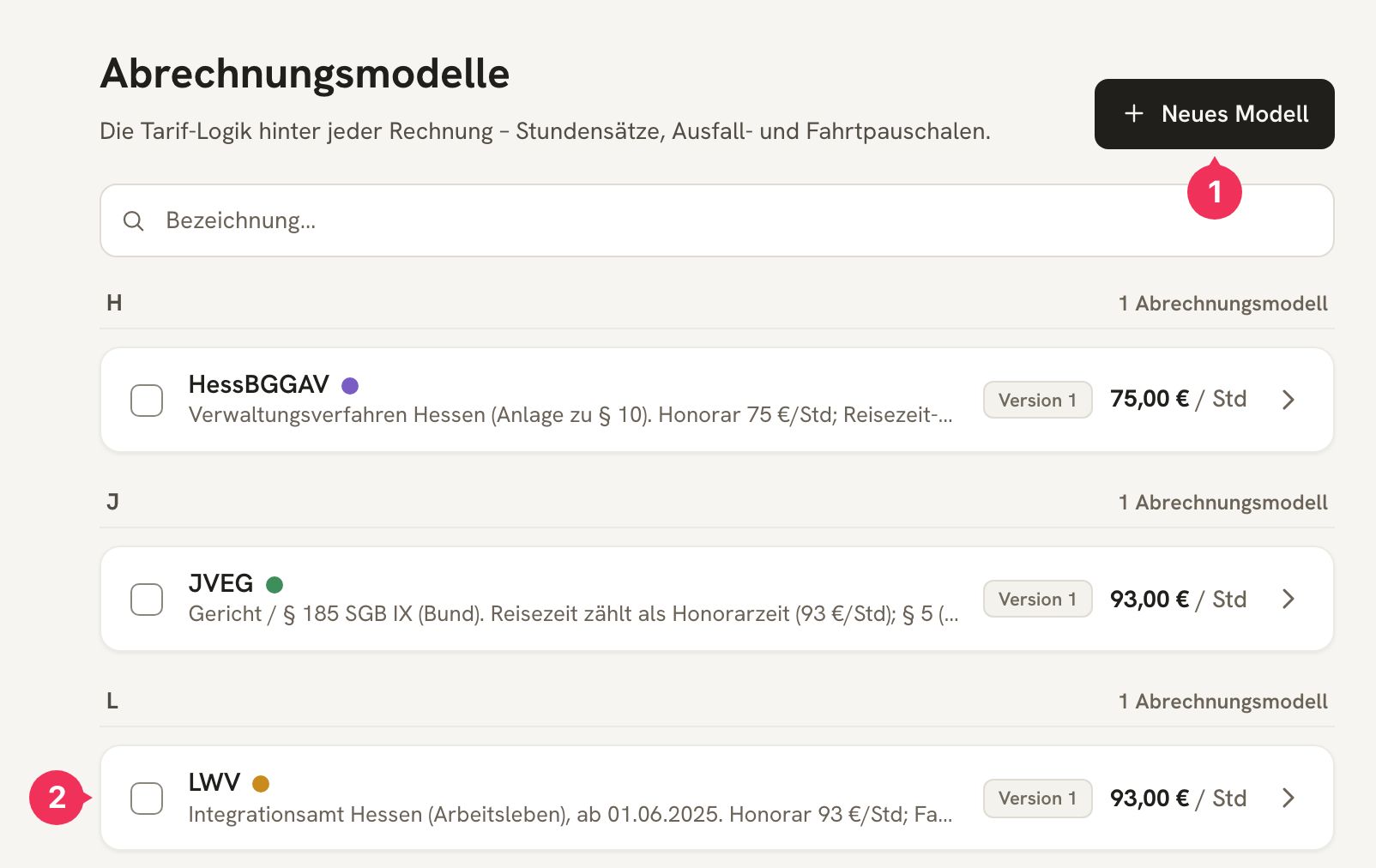
- Neues Modell creates a blank model.
- Clicking a row opens the model in the editor.
The Concept: Five Blocks
A model is a form made up of five blocks. Each block answers a question:
| Block | Question |
|---|---|
| 1 Identität | What's the model called? |
| 2 Dolmetschhonorar | What does the interpreting time cost? |
| 3 Fahrtkosten | How is the trip compensated – the time and the distance? |
| 4 Ausfall & Absage | What happens if the assignment doesn't take place? |
| 5 Zusätzliche Pauschalen | What's always added (or added for online) on top? |
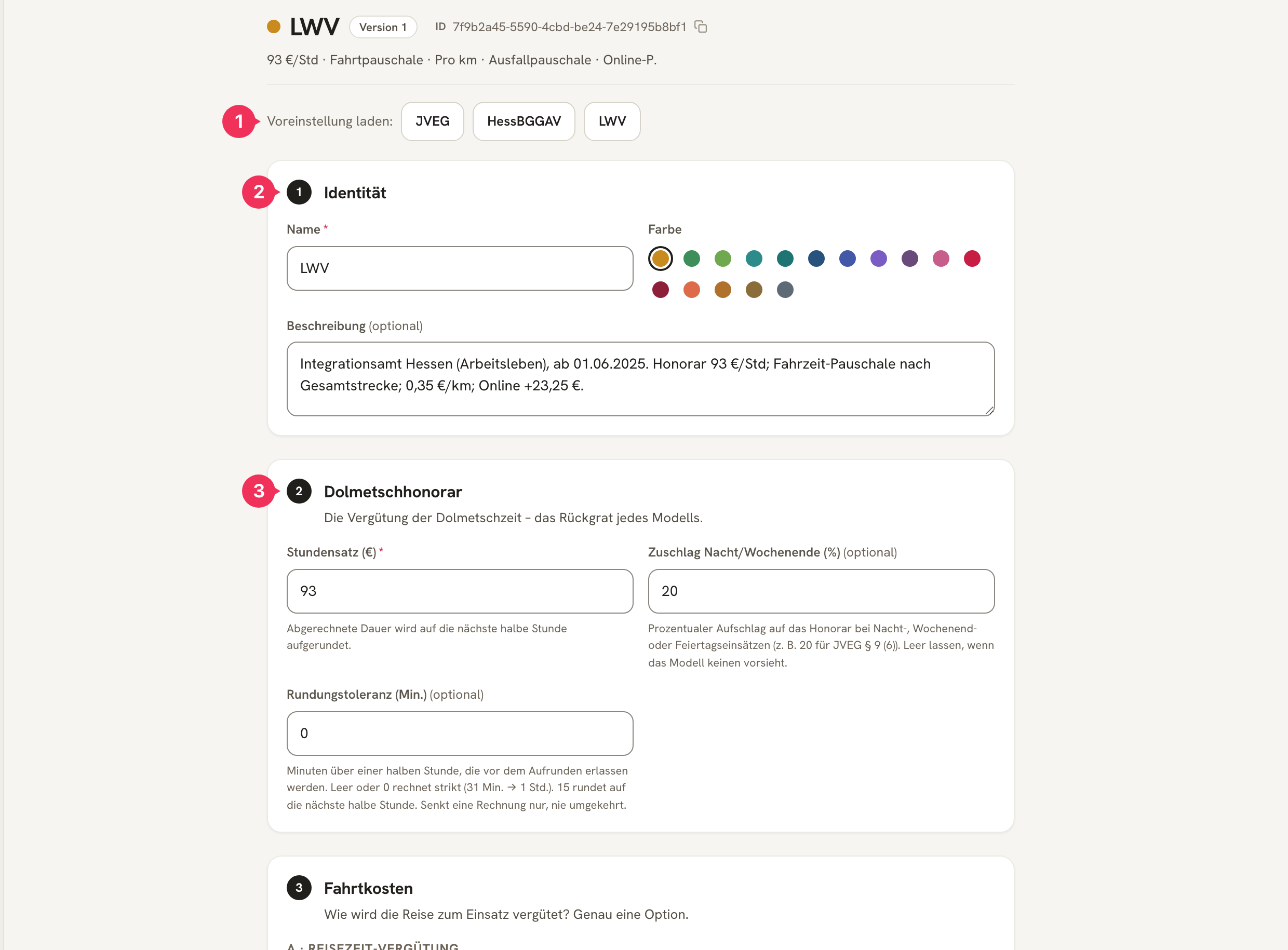
- Voreinstellung laden fills in all blocks with the values from one of the three rule sets – a good starting point that you then adjust.
- Block 1 – Identität.
- Block 2 – Dolmetschhonorar. And so on down the list.
The Calculation Logic
When an invoice is generated, the assignment runs through exactly this path:


In plain terms: the fee and the travel costs are generated independently of one another. That's exactly why a model like the JVEG can bill travel time as part of the fee and additionally charge 0,42 €/km, while the LWV has both a travel-time flat fee and 0,35 €/km.
Now let's look at the blocks in detail.
Identity
| Field | Explanation |
|---|---|
| Name | The unique name of the rate – this is how it appears with the Kostenträger and on the invoice. |
| Farbe | The color dot in lists. Handy for telling models apart at a glance. |
| Beschreibung | Optional. What's the model for, and where do the rates come from? |
Interpreting fee
The backbone of every model.
| Field | Explanation |
|---|---|
| Stundensatz (€) | Required field. The billed duration is rounded up to the next half hour. |
| Zuschlag Nacht/Wochenende (%) | Percentage surcharge on the fee when the assignment is marked as a night, weekend, or public-holiday assignment (JVEG § 9 Abs. 6: 20). Leave blank if there isn't one. |
| Rundungstoleranz (Min.) | Minutes beyond a half hour that are forgiven before rounding up. |
The Rundungstoleranz is worth a second look:
- 0 (default): strictly rounded up. 1:31 hrs → 2,0 hrs.
- 15: a quarter hour is forgiven, which corresponds to commercial rounding to the half hour. 1:31 hrs → 1,5 hrs, 1:46 hrs → 2,0 hrs.
It can only lower an invoice, never raise it – so when in doubt, you give away minutes rather than overcharging.
Travel costs
The block that saves you the most confusion: travel time and travel distance are two separate questions, and both can apply at once.
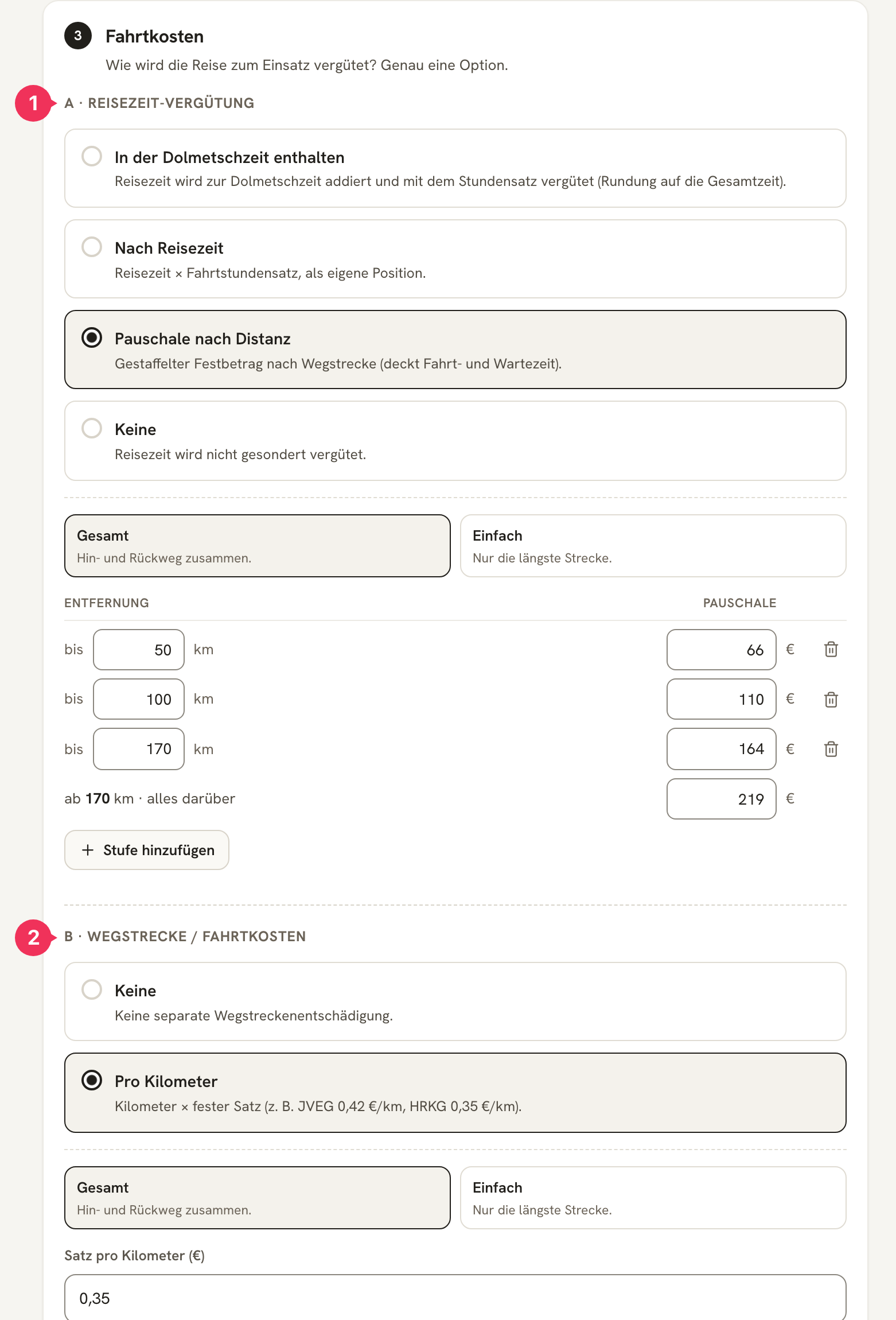
A · Reisezeit-Vergütung – how is time on the road paid? Exactly one option:
| Option | Effect | Typical for |
|---|---|---|
| In der Dolmetschzeit enthalten | Travel time is added to the interpreting time and paid at the hourly rate (rounding applies to the total time). No separate line item. | JVEG |
| Nach Reisezeit | Travel time × travel hourly rate, as its own line item. | custom agreements |
| Pauschale nach Distanz | A tiered fixed amount based on the distance – covers both travel and waiting time. | LWV, HessBGGAV |
| Keine | Travel time is not compensated separately. | – |
B · Wegstrecke / Fahrtkosten – is the distance itself reimbursed?
| Option | Effect |
|---|---|
| Keine | No separate distance allowance. |
| Pro Kilometer | Kilometers × a fixed rate (JVEG § 5 Abs. 2: 0,42 €/km; HRKG: 0,35 €/km). |
For both parts, you decide which distance counts:
- Gesamt – outbound and return trip combined (LWV, JVEG).
- Einfach – only the longest leg (HessBGGAV).
No-show and cancellation
What happens if the assignment didn't take place? Two options:
| Option | Effect |
|---|---|
| Wie ein normaler Einsatz | Planned duration × hourly rate. |
| Gestaffelte Ausfallpauschale | A fixed amount depending on the planned duration – see The Tier Builder. |
The difference between the two assignment types lies in the travel: with a cancellation, you never set off at all, so there's only the no-show fee. With a no-show, you were on site – the travel is compensated exactly as it would be for an on-site appointment.
Three more fields cover deadlines and exceptions:
| Field | Explanation |
|---|---|
| Frist für Ausfallkosten (Tage) | How short-notice the cancellation must have been for the Kostenträger to pay at all. JVEG 2 · HessBGGAV 0 · LWV 2. The deadline never blocks an invoice – DolmiDesk™ only shows a warning. |
| Fristart | Calendar days (JVEG, HessBGGAV) or business days Mon.–Fri. (LWV). |
| Ausfallentschädigung ersetzt die Fahrtvergütung | Under HessBGGAV, 75 € is paid "instead of the compensation under items a to c" – in that case, travel time and mileage are dropped. Under LWV and JVEG, the travel is added on top. |
| Anspruch verfällt nach (Tagen) | The deadline by which the invoice must be issued (JVEG § 2 Abs. 1: 90 Tage). This, too, is only a warning. |
Additional flat fees
Everything here is optional – leaving a field blank means "don't charge it".
| Field | Effect |
|---|---|
| Online-Pauschale (€) | Only for online assignments (LWV: 23,25 €). |
| Vorbereitungspauschale (€) | Added to every invoice under this model. |
| Sonstiges (€) | A free-form fixed surcharge, also always applied. |
The Tier Builder
Wherever a fixed amount depends on some quantity – distance for the travel-time flat fee, duration for the no-show flat fee – you build the values in this same small table.
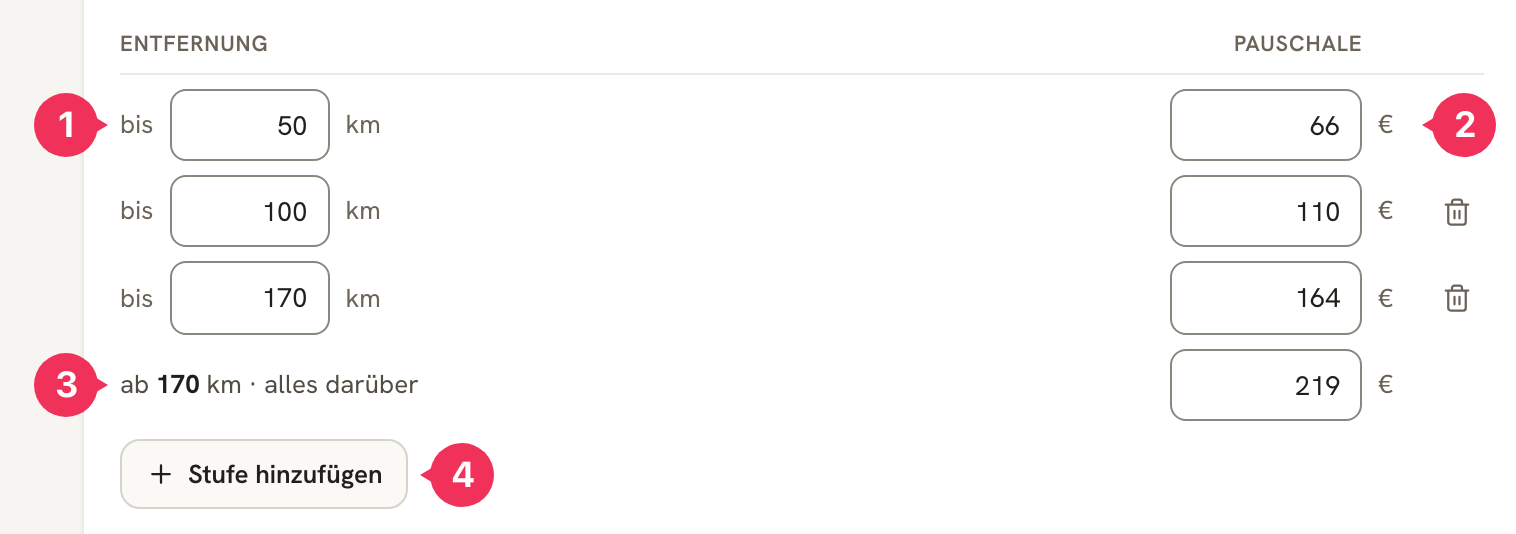
- Grenze (the threshold) – up to which value this step applies.
- Betrag (the amount) – what's charged at this step.
- The open-ended step – the last row has no Grenze ("from 170 km · everything above") and catches everything above the second-to-last threshold. It's always there and can't be deleted.
- Stufe hinzufügen inserts a new row before the open-ended step.
Here's how the system reads the tier schedule:
The first step whose Grenze is greater than or equal to the measured value applies. If none matches, the open-ended step takes over.
For the tier schedule above (Distanzberechnung "Gesamt"), that means:
| Distance driven | Matching step | Amount |
|---|---|---|
| 25 km out + 25 km back = 50 km | up to 50 km | 66,00 € |
| 60 km + 60 km = 120 km | up to 170 km | 164,00 € |
| 100 km + 100 km = 200 km | from 170 km | 219,00 € |
A few rules the editor enforces:
- The thresholds must be ascending – each step greater than the previous one.
- An amount can't be smaller than the previous step's (otherwise you'll see: "Nicht günstiger als vorige Stufe").
- For no-show tier schedules, only half-hour thresholds are allowed.
- The comparison uses the same value that ends up on the invoice: the rounded-up distance in whole kilometers, or the billed duration after rounding and tolerance.
Testing a Model
Before you unleash a model on real assignments, you can try it out. The Modell testen button at the bottom of the editor sends sample assignments through the same calculation engine that later generates the invoice.
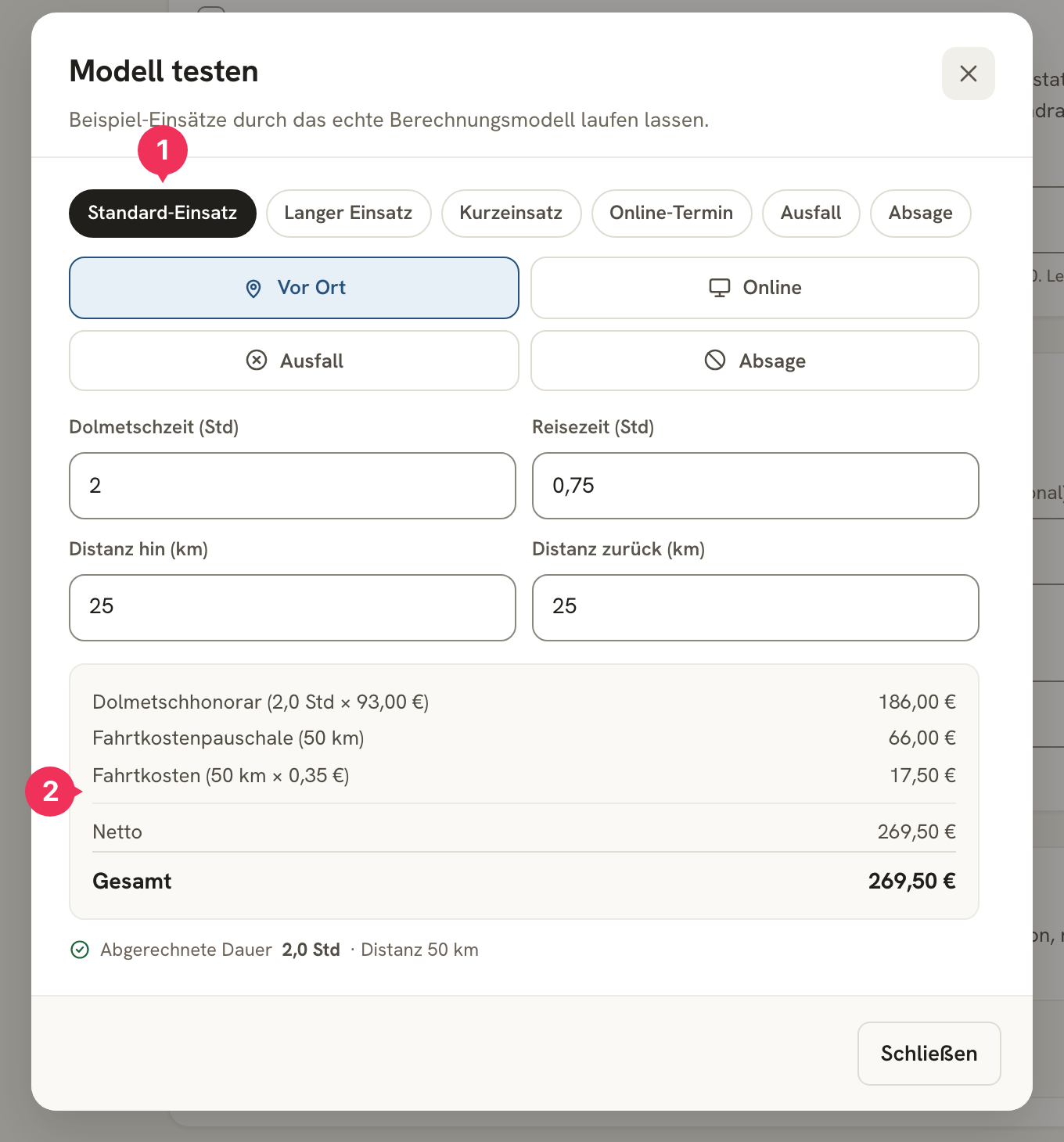
- Choose a scenario – Standard-Einsatz, langer Einsatz, Kurzeinsatz, Online, Ausfall, or Absage. After that, you can freely change the Auftragstyp, times, and distances.
- The result – exactly the line items that will later appear on the invoice, including Netto and Brutto.
A worked example
The LWV model (93 €/Std · travel flat fee based on total distance · 0,35 €/km) with a Standard-Einsatz:
- Interpreting time: 2,0 hrs
- Travel time: 0,75 hrs
- Distance: 25 km out, 25 km back
| Position | Source | Amount |
|---|---|---|
| Dolmetschhonorar (2,0 Std × 93,00 €) | Block 2 – duration × Stundensatz | 186,00 € |
| Fahrtkostenpauschale (50 km) | Block 3 A – tier schedule, "bis 50 km" step | 66,00 € |
| Fahrtkosten (50 km × 0,35 €) | Block 3 B – kilometers × rate | 17,50 € |
| Netto | 269,50 € |
Two things stand out here:
- The 0,75 hrs of travel time never show up anywhere – they're covered by the flat fee from Part A. With the JVEG, it would be the other way around: there, it would be added to the interpreting time (2,0 + 0,75 → rounded up to 3,0 hrs) and there'd be no travel flat fee, but 0,42 €/km instead.
- A and B add up. The flat fee compensates the time, the mileage allowance the distance – having both side by side is exactly right for the LWV.
Guide: Creating a New Calculation Model
Suppose you have a new Kostenträger "Behörde X" with its own rules: 80 € per hour, a flat 50 € in travel costs up to 20 km and 100 € above that, and always two hours in the event of a no-show.
Create the model
Click Neues Modell in the list. If an existing rule set comes close to yours, load it via Voreinstellung laden and adjust it – that saves you half the work.
Identity and fee
Enter Behörde X as the Name, choose a Farbe, and set the Stundensatz to 80. Leave Zuschlag and Rundungstoleranz blank if the agency doesn't provide for anything like that.
Travel costs
The agency pays a flat fee only, no mileage allowance:
- A · Reisezeit-Vergütung:
Pauschale nach Distanz, DistanzberechnungGesamt. - The tier schedule gets one step plus the open-ended step:
| Stufe | Betrag |
|---|---|
| bis 20 km | 50,00 € |
| ab 20 km · alles darüber | 100,00 € |
- B · Wegstrecke:
Keine.
No-show rules
For a no-show, the agency always pays two hours, regardless of how long the assignment was planned for. Choose Gestaffelte Ausfallpauschale and leave only the open-ended step:
| Stufe | Betrag |
|---|---|
| ab 0 Std · alles darüber | 160,00 € |
Test and save
Click Modell testen and check the "Standard-Einsatz" and "Ausfall" scenarios. If the amounts are correct, save the model.
Assign the Kostenträger
Open the Kostenträger "Behörde X" and, in the Abrechnung section, select the new model. From now on, every assignment for this Kostenträger will be calculated accordingly.
Changes and Versions
A calculation model isn't something you set up once and never touch again – rates get raised, agreements change. So that old invoices remain unaffected, every change creates a new version.
- Invoices already issued keep the version they were calculated with. Nothing ever changes retroactively.
- You'll find earlier versions in the editor under Verlauf – read-only, but viewable at any time.
- A model that's already on an invoice can no longer be deleted. If you need a variant, use Duplizieren.
About the author