Invoice Templates: the Text on Your Documents
Informationen zum Artikel

Autor: Dmitry Dugarev
The layout of your invoice – letterhead, address field, line item table, totals block – is already built and legally compliant. Your details for it (name, address, tax number, bank) live in Settings.
What an invoice template controls is the wording: how the invoice opens, what each line item is called and how it's described, what appears below the total – and how a cancellation, a correction or a reminder is phrased.
A court expects different language than a health insurer. That's exactly why there are multiple templates.
The List
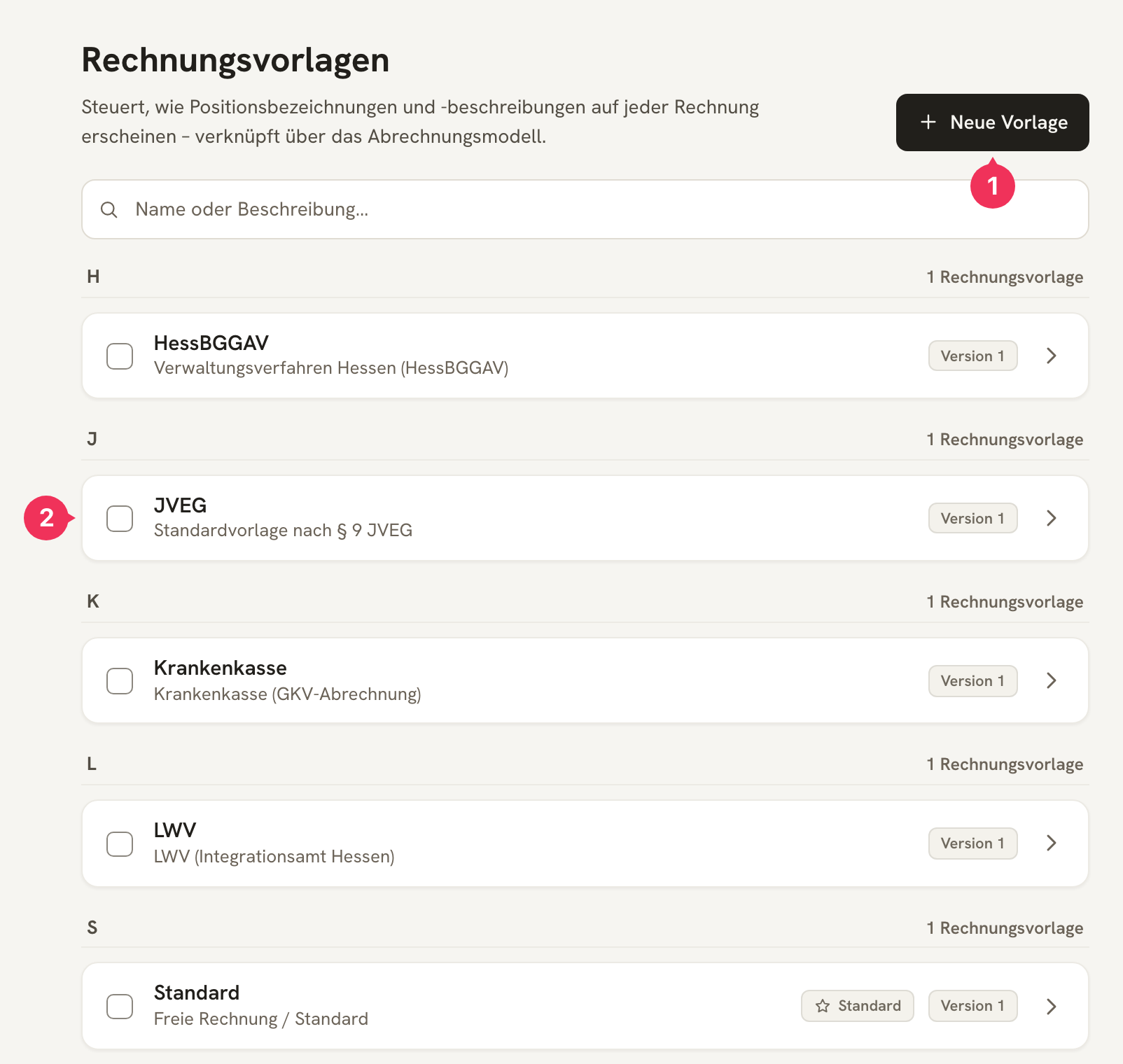
- Neue Vorlage (New template) creates one – fastest if you load a preset right after.
- One template carries the Standard label: it applies to every Kostenträger (cost bearer) that has nothing else assigned.
Five templates are already set up: Standard, JVEG, HessBGGAV, LWV and Krankenkasse.
The Editor
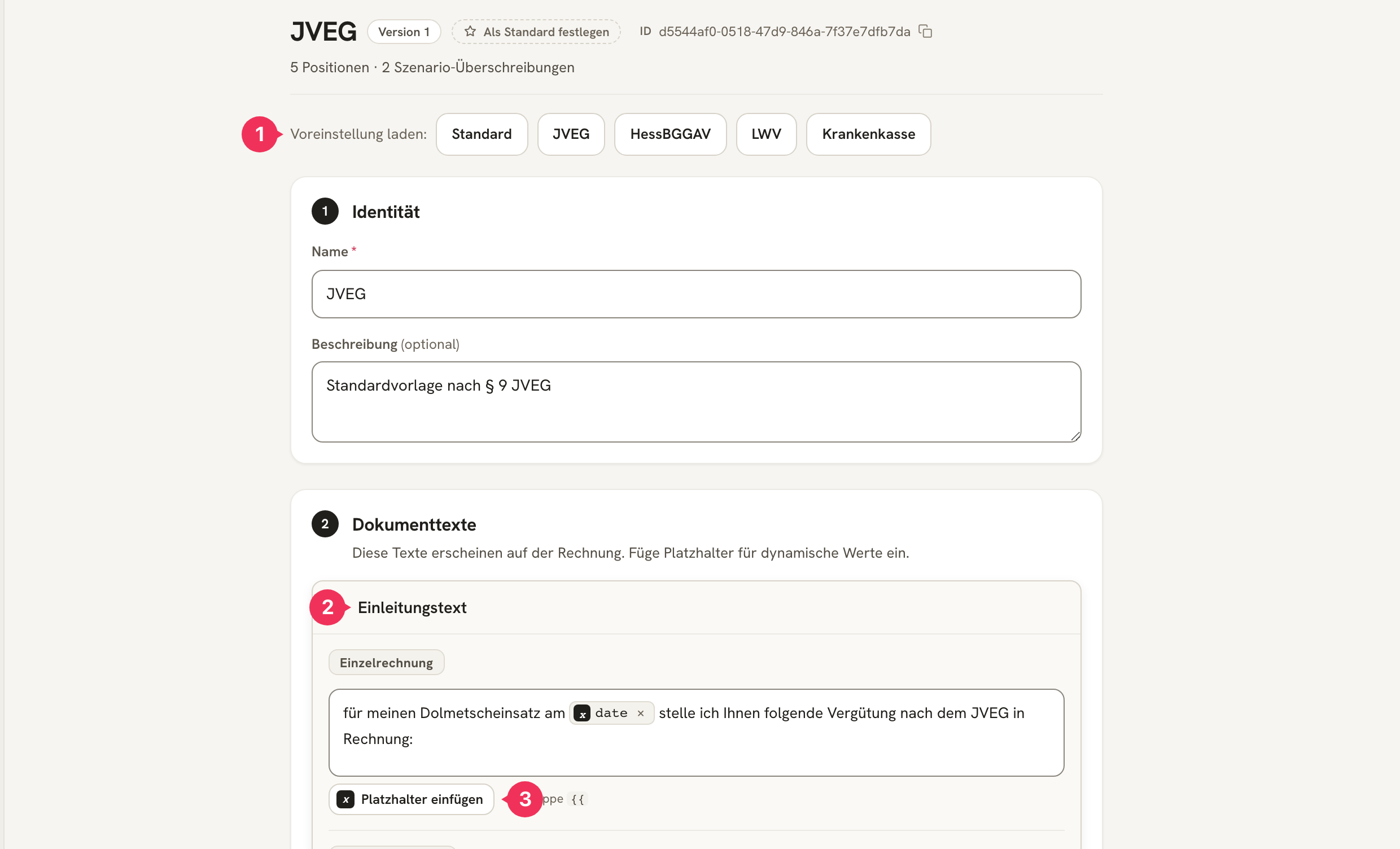
- Voreinstellung laden (Load preset) replaces the entire content with one of the five ready-made text sets – a good starting point.
- The opening text sits above the line items. It has its own variant for collective invoices ("for my interpreting assignments listed below …").
- Platzhalter einfügen (Insert placeholder) inserts dynamic values into the text – see Placeholder System.
The editor is organized into four blocks.
Identity
The template's name and description. The name appears in the selection list on the Kostenträger (cost bearer).
Document Texts
The opening text above the line items and the closing text below the totals – the place for legal references such as "This invoice was calculated in accordance with § 9 JVEG."
Both can have their own version for collective invoices: a singular-form sentence ("for my interpreting assignment on …") doesn't fit when ten assignments appear on one document. Use Variante für Sammelrechnung hinzufügen (Add variant for collective invoice) to create the second version; without it, the normal text is used for both.
Texts for Cancellation, Correction & Reminders
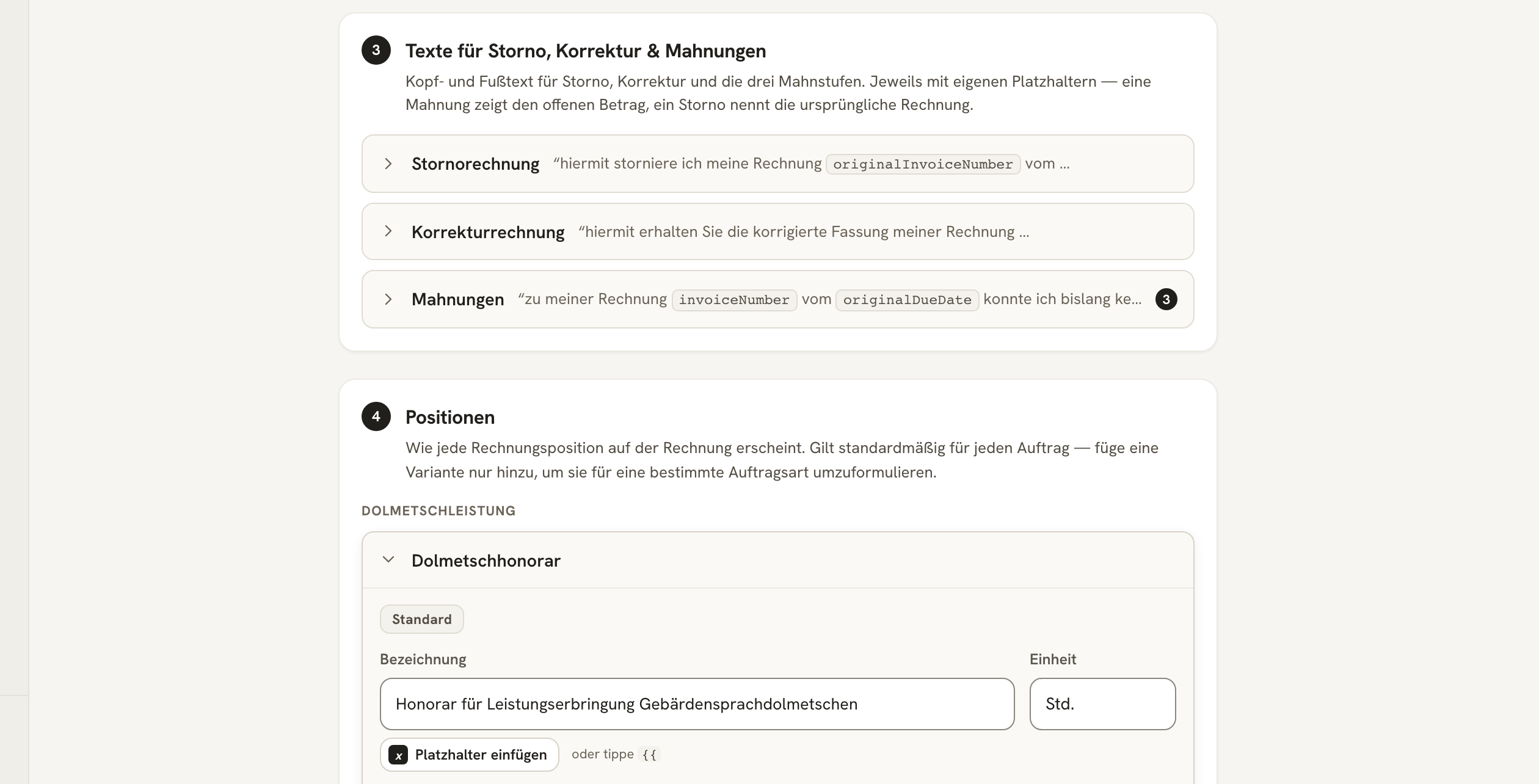
Three document types need different language than a normal invoice – and different placeholders:
| Document type | What the text needs to do |
|---|---|
| Stornorechnung (Cancellation invoice) | Name the original invoice and make clear that the amount no longer applies. |
| Korrekturrechnung (Correction invoice) | Refer to the original and the cancellation, and announce the corrected line items. |
| Mahnungen (Reminders) | Remind of the outstanding invoice and set a new deadline. |
For reminders, level 1 is the base – levels 2 and 3 use the same text as long as you don't override them. If the third reminder needs a firmer tone, use Stufe hinzufügen (Add level) to add a custom version just for that level.
Line Items
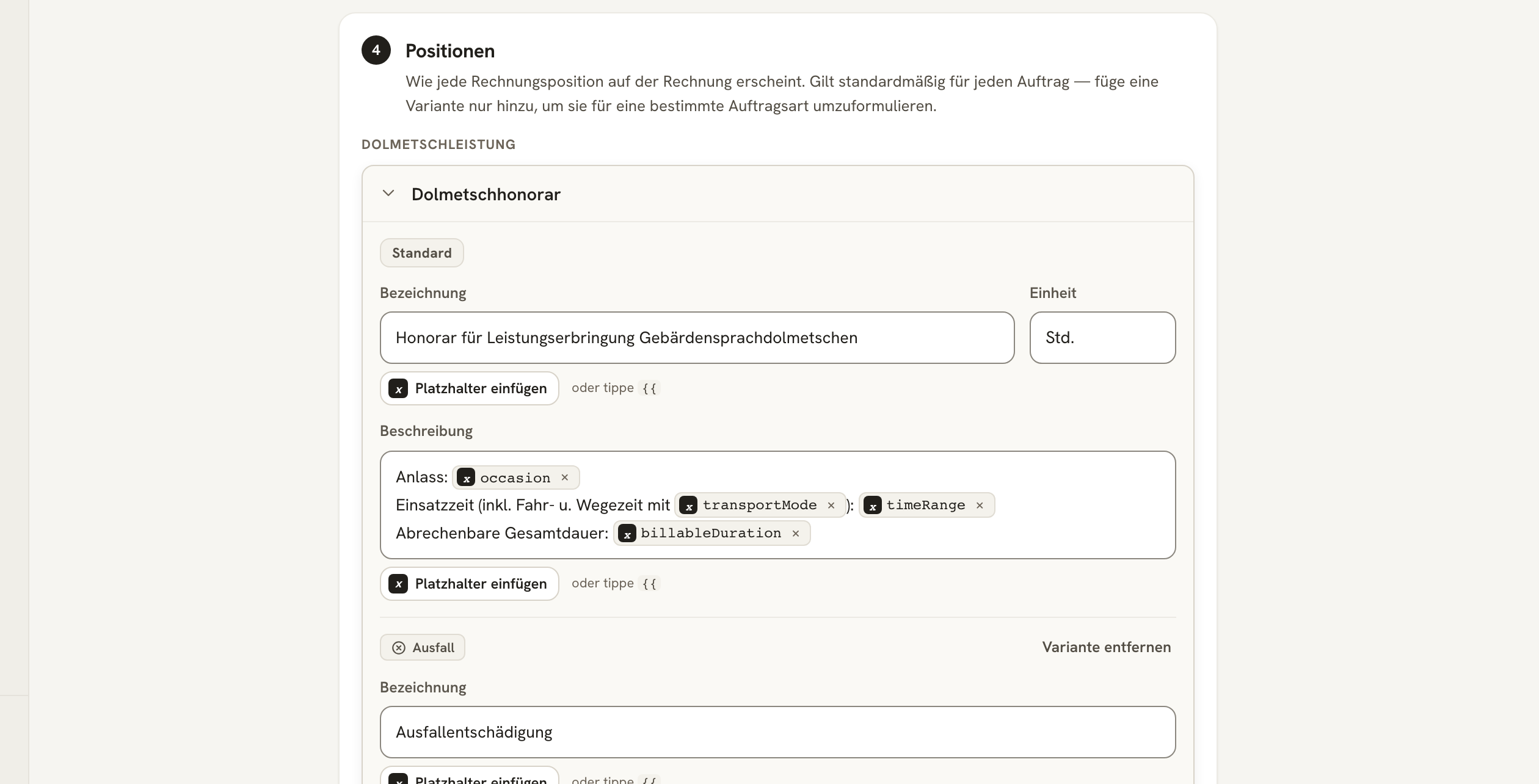
Here you define what each line on the invoice is called. The line items themselves come from the Abrechnungsmodell (billing model) – the template only determines their label:
| Group | Line items |
|---|---|
| Dolmetschleistung (Interpreting service) | Dolmetschhonorar (Interpreting fee) |
| Fahrtkosten (Travel costs) | Fahrtzeit (Travel time) · Fahrzeitpauschale (Travel time flat rate) · Fahrtkosten (PKW/km) (Travel costs – car/km) · ÖPNV (Public transport) |
| Zusatzpauschalen (Additional flat rates) | Online-Pauschale (Online flat rate) · Vorbereitungspauschale (Preparation flat rate) · Sonstige Pauschale (Other flat rate) |
Each line item has three fields:
- Bezeichnung (Label) – the short form, e.g. "Honorar für Leistungserbringung Gebärdensprachdolmetschen" (Fee for provision of sign language interpreting services).
- Beschreibung (Description) – the detail line below it, typically full of placeholders (occasion, assignment time, billable total duration).
- Einheit (Unit) – e.g.
Std.(hrs.),kmorPauschale(flat rate).
At the very bottom of the block are the four amount lines for a reminder (outstanding amount, reminder fee, default interest, total due). The amounts themselves come from Einstellungen → Mahnwesen (Settings → Reminders); here you only change their labels.
The Preview
Before a template is unleashed on real documents, take a look at it. Vorschau (Preview) renders a complete sample document.
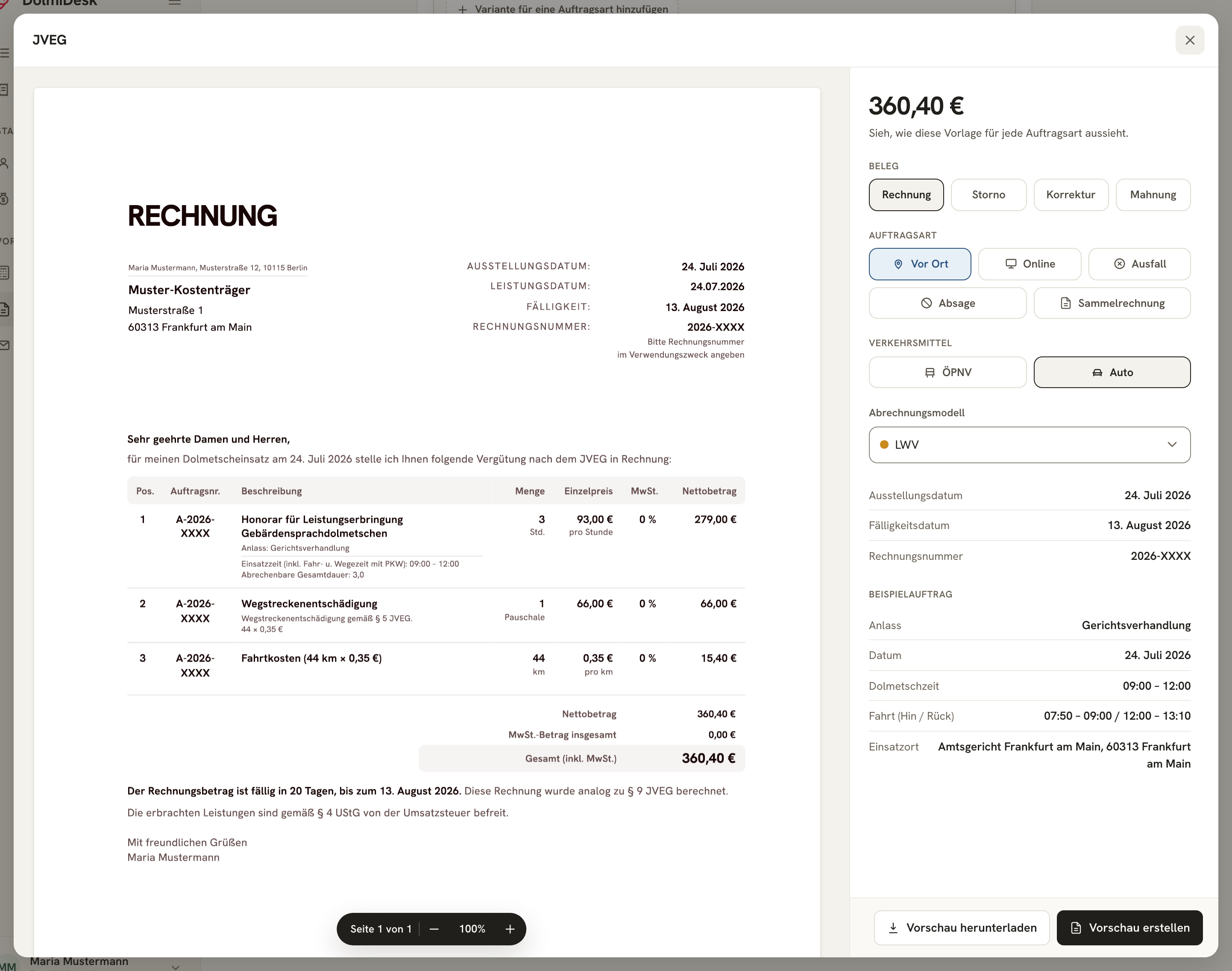
On the right, you can switch through:
- Beleg (Document): Rechnung (invoice) · Storno (cancellation) · Korrektur (correction) · Mahnung (reminder) – here you see your variant texts in action.
- Auftragsart (Assignment type): Vor Ort (on-site) · Online · Ausfall (no-show) · Absage (cancelled) · Sammelrechnung (collective invoice).
- Verkehrsmittel (Mode of transport) and Abrechnungsmodell (billing model): these change which line items appear at all.
The sample assignment at the bottom right shows which values were used for the calculation. Use Vorschau herunterladen (Download preview) to get the PDF.
Versions and Assignment
- Every change creates a new version. Invoices already issued keep their version – a new text never appears retroactively on an old document.
- A template that's already used on an invoice cannot be deleted. If you need a variation, use Duplizieren (Duplicate).
- It's assigned on the Kostenträger (cost bearer) in the Abrechnung (Billing) section. Anyone who selects nothing there gets the Standardvorlage (standard template).
About the author