Sending: the invoice goes out
Informationen zum Artikel

Autor: Dmitry Dugarev
The invoice has been created and checked. Now it needs to go to the Kostenträger (cost bearer).
DolmiDesk™ sends it itself – you don't need your own mailbox or your own domain, and you don't have to download anything and attach it somewhere else.
What gets sent
| Component | Source |
|---|---|
| The invoice | As a PDF with an embedded e-invoice (ZUGFeRD) – one document for both humans and accounting software. |
| The attachments | Everything attached to the assignment: assignment confirmations, public transport tickets, parking receipts. |
| Subject and body | From the Kostenträger's email template, with placeholders filled in. |
| Recipient | The Kostenträger's email address, plus an optional CC address. |
Sending an invoice
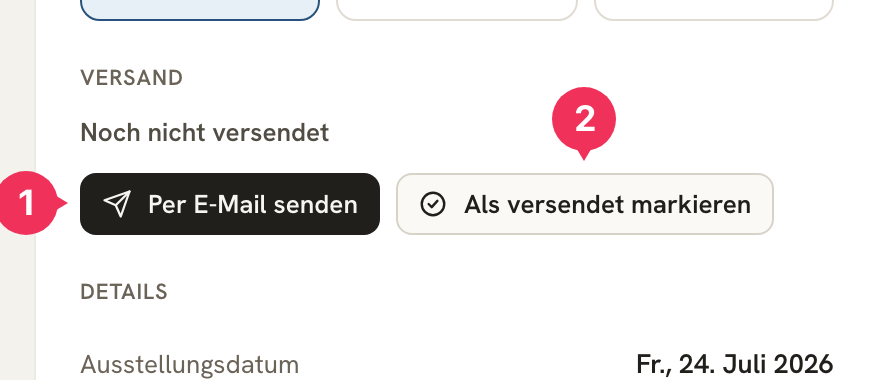
Open the invoice. In the right-hand panel you'll find Versand:
- Per E-Mail senden – DolmiDesk™ sends it for you.
- Als versendet markieren – in case you've delivered it another way.
The Versand dialog
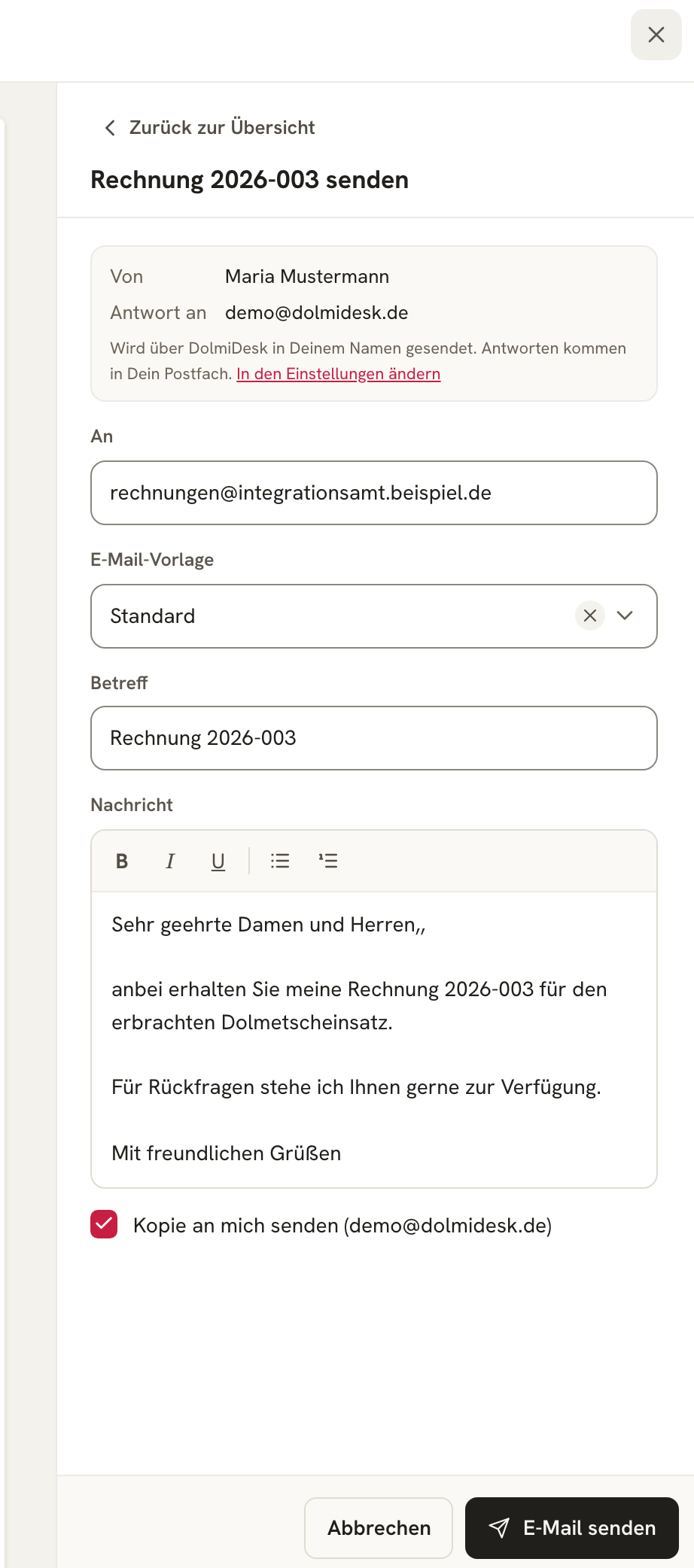
| Field | Meaning |
|---|---|
| Von / Antwort an | Your sender details from Einstellungen → E-Mail (Settings → Email). Sending happens via DolmiDesk™ on your behalf; replies land in your own mailbox. |
| An | Comes from the Kostenträger. You can override it for this one message. |
| E-Mail-Vorlage | The Kostenträger's template – switchable if you want this message to sound different. |
| Betreff / Nachricht | Pre-filled from the template, with placeholders inserted. Both can be freely edited before sending. |
| Kopie an mich | Sends you a blind copy (BCC) to your account email address. |
One click on E-Mail senden, and the invoice is on its way. The Versand block then shows Versendet am … and offers Erneut per E-Mail senden in case something still needs to be resent.
Without email: post and portals
Some Kostenträger want paper, others have their own invoice portal. In that case, download the invoice as a PDF via Herunterladen – the file name follows the pattern from your Einstellungen (Settings) – and submit it however required.
Then click Als versendet markieren so due dates and Mahnwesen keep running correctly.
Sending automatically
If you set a Kostenträger's Rechnungs-Automatisierung to Erstellen & senden, you don't have to do anything else: as soon as an imported assignment is fully documented, the invoice is created and goes out immediately.
For that, the Kostenträger needs an email address on file – without one, this stage isn't available.
Sending reminders
A reminder is delivered just like an invoice: in the invoice's Mahnwesen block, each level has three actions – herunterladen, per E-Mail senden, and als versendet markieren.
If the Kostenträger has its own E-Mail-Vorlage für Mahnungen, that one is used; otherwise the normal one.
The same rule applies here: the next reminder level is only created once the previous one is marked as sent. More on this under Reminders.
And what about the accounting?
Two ways, without you shuffling files back and forth:
- Beleg-Upload E-Mail: In your Einstellungen, enter your accounting software's receipt address. Invoices and reminders will then automatically also go there.
- GoBD-Export: For your tax advisor or a tax audit, you generate a complete archive of a period under Einstellungen → Datenexport & -import – with all records, payments, reminders, and original files.
If sending fails
If an email doesn't get through – wrong address, full mailbox, rejecting server – you'll find out in two ways: via the Versand fehlgeschlagen notification in the daily summary, and on the invoice itself, which continues to be shown as not sent.
Then check the address with the Kostenträger and resend.
About the author